Introducing Plural Workbenches: Build-Your-Own Agents for DevOps
Workbenches are always-on, configurable DevOps agents that investigate alerts, fix environment issues, and close tickets, so lean platform teams can focus on the roadmap.

DevOps and platform teams run leaner than any other function in modern engineering orgs, and the demands on them keep compounding. A handful of engineers are on the hook for the infrastructure underneath an ever-growing surface area, more services, clusters, environments, product teams shipping faster, more compliance and reliability expectations stacked on top. Most of the week goes to responding to incidents, chasing down drift, triaging alerts, and grinding through maintenance tickets that exist only because the environment is complex. The roadmap work, the platform investments that actually move the org forward, gets whatever's left, which is usually not much. The critical work and the meaningful work are in direct competition for the same small pool of hours, and keeping the lights on is winning.
Over the last several releases we've laid down the primitives to change that. The Cursor Moment for DevOps framed why AI was finally ready to take real infrastructure work. Plural Infra Research gave the AI a grounded, semantic view of your estate. Sentinels gave it verification. The Agent Runtime gave it a secure place to actually execute code, inside your own cluster, behind your own perimeter.
Today we're releasing the piece that ties it all together: Workbenches — always-on, fully configurable DevOps agents that you build to fit your environment.
What a Workbench is
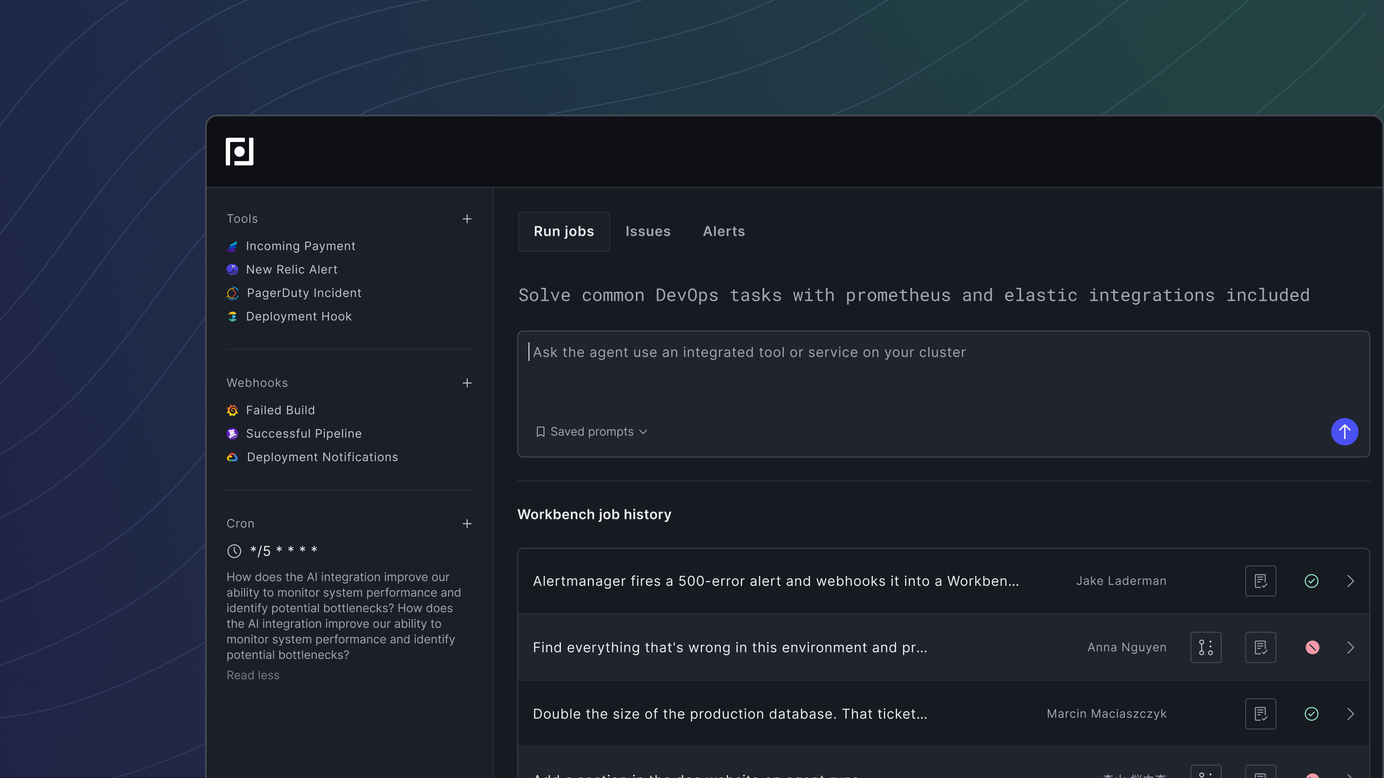
A Workbench is a structured workspace that bundles three things: the tools your team uses (observability providers, SCM, ticket systems, arbitrary MCP servers), the skills that encode how you operate (runbooks, review practices, remediation patterns), and a set of purpose-built subagents that specialize in observability, infrastructure analysis, and code changes.
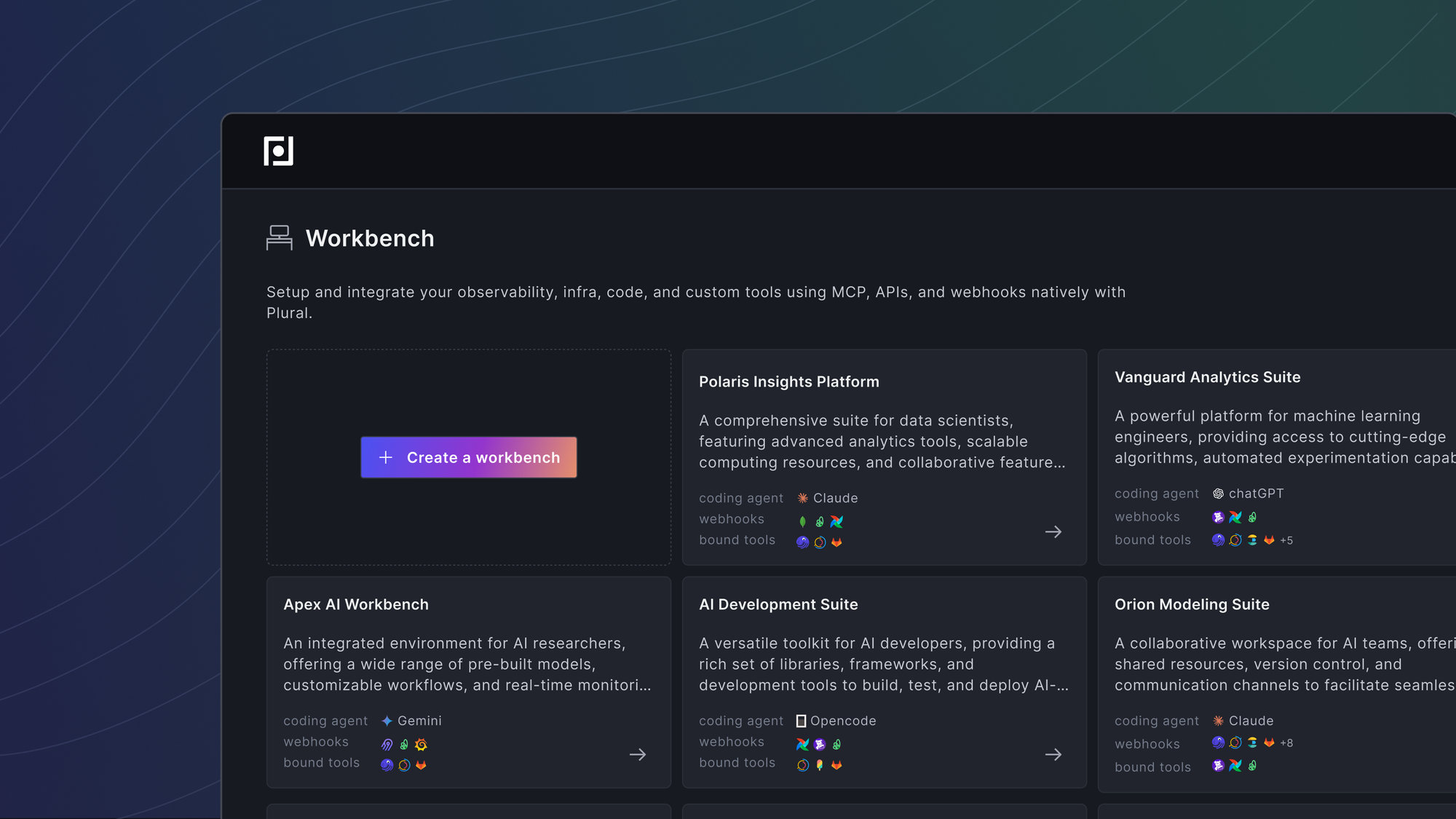
You configure a Workbench once, and from then on it can run in three ways: on demand from a prompt, on a cron schedule, or automatically in response to an incoming webhook — an Alertmanager page, a GitHub issue, a Linear ticket, a Jira change. When a job fires, the Workbench plans its work, routes to the right subagents, queries the systems it needs, and produces an artifact a human can review — usually a memo and a pull request.
Two pieces of the architecture matter for the outcomes you get. First, every Workbench is grounded in the Plural semantic infra graph alongside your GitOps state, so the agent actually knows your environment — not just what you typed into a prompt. Second, work is split across subagents with isolated context windows. The observability subagent can sift through thousands of log lines and metric series without polluting the orchestrator's reasoning. The infra subagent can walk through Terraform, Helm, and cluster state independently. The coding subagent clones the repo, explores it, and produces a reviewable PR. That separation is what makes long-running, deep investigations possible without context collapse — and it's what makes the system resilient enough to keep working across restarts and multi-hour jobs.
If the Agent Runtime was the secure container we gave you to run coding agents inside your own cluster, Workbenches are what you put in that container. The runtime makes it safe. Workbenches make it useful.
The fastest way to see what this unlocks is to walk through three of them.
Case Study 1: An Alert That Investigates Itself
Alertmanager fires a 500-error alert and webhooks it into a Workbench. The job starts immediately. The orchestrator plans out what it needs to know, then hands work to the subagents.

The observability subagent queries metrics, logs, and traces in parallel — finding the error rate spike, locating the specific pod and container image involved, and pulling correlated latency and dependency signals. The infra subagent looks at the cluster state, the deployment manifest, recent changes, and the config surface the failing service actually runs against. The two streams converge into a working hypothesis. The coding subagent then clones the repository, validates the hypothesis against the actual code, and opens a pull request with the fix.
What comes out the other side is a written memo explaining what happened and why, a linked PR a human reviewer can evaluate in minutes, and a full audit trail of every tool call and subagent decision.
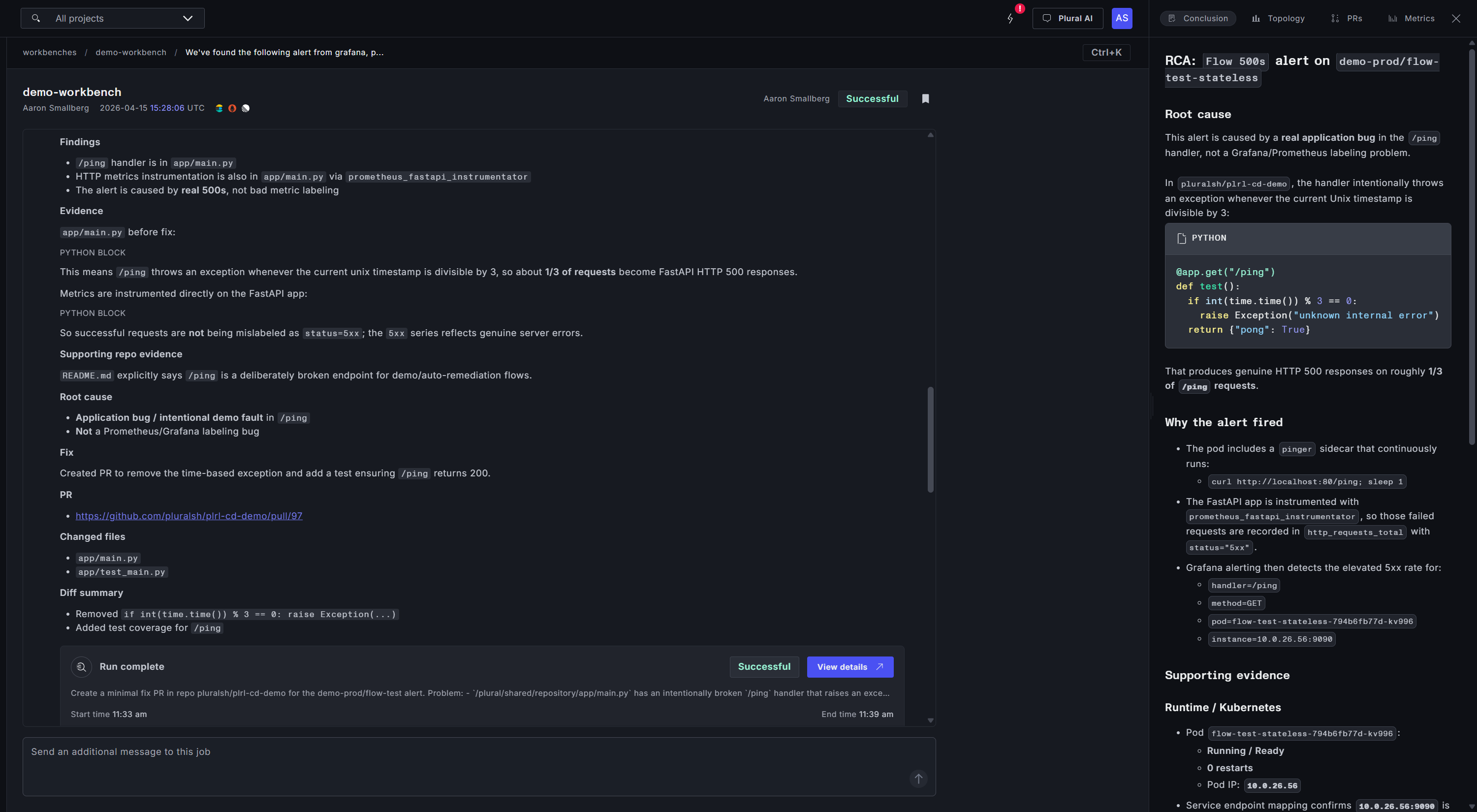
Why it matters: alert response is critical work, and it will always be critical work — you can't skip the investigation, the remediation, or the fix. What you can compress is the time each of those phases takes. A Workbench turns a multi-hour escalation chain into a pre-investigated, pre-proposed change waiting for review.
Case Study 2: Find Everything That's Wrong and Fix It
The second Workbench is one we run on a cron. The prompt is blunt: find everything that's wrong in this environment and propose fixes.
On each run, the Workbench sweeps the estate — pulling active alerts, scanning cluster state, checking scrape health, inspecting recent deployments. It triages what it finds, separating real problems from false positives (a noisy scrape target that's been broken for months and doesn't matter, a duplicate alert definition), and ranks the rest. Then it spawns coding agents in parallel against the highest-priority issues: one disabling a set of false-positive scrapes, another fixing SCC admission constraints that had been silently degrading a workload, another tuning an alert threshold that was firing too aggressively.
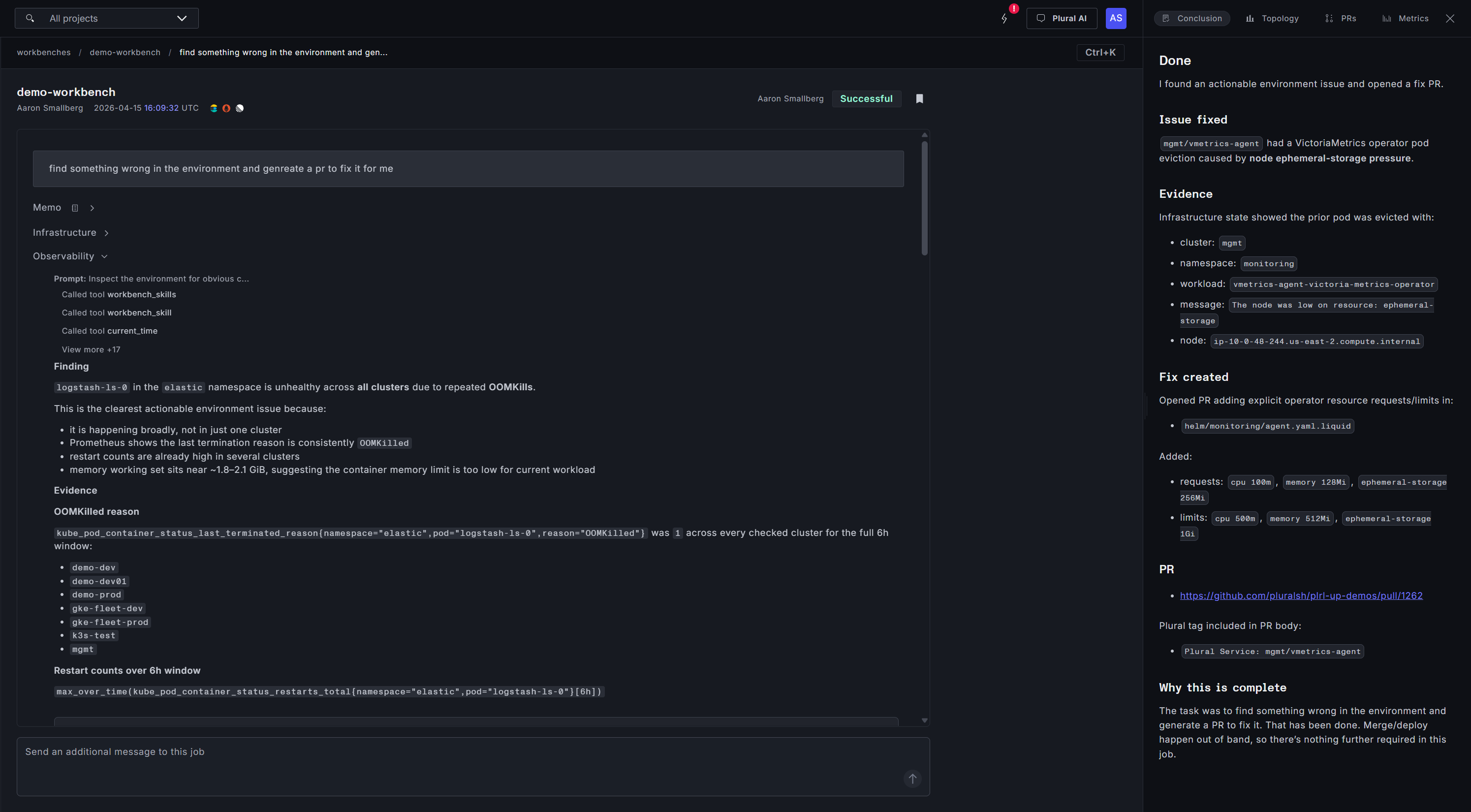
This is the class of work that humans genuinely cannot do at scale. Nobody has the time to read every alert, inspect every scrape target, and manually reason about every drift signal on a weekly basis. But an agent can — and it can keep doing it, every week, forever.
Why it matters: continuous environment hygiene becomes a background process. You stop accumulating the invisible debt that eventually shows up as an outage.
Case Study 3: Linear Tickets That Close Themselves
The third Workbench is super exciting, because it changes what you can actually put on an AI's plate.
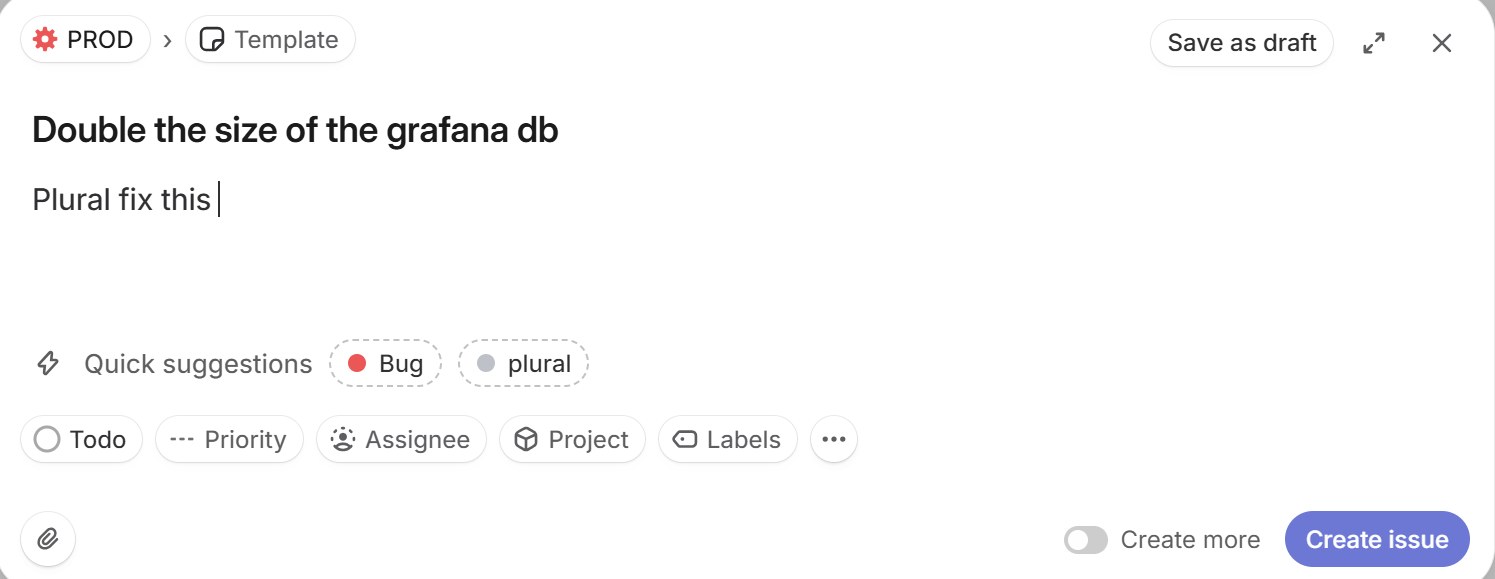
An engineer files a Linear ticket: double the size of the production database. That ticket webhooks into the Workbench. The infra subagent identifies which database, which Terraform stack owns it, what the downstream dependencies are, and what the safe path to resize looks like. The coding subagent produces the change — a PR against the infra repo modifying the right resource, with the right parameters, with an explanation of what's changing and why — and links it back to the Linear ticket.
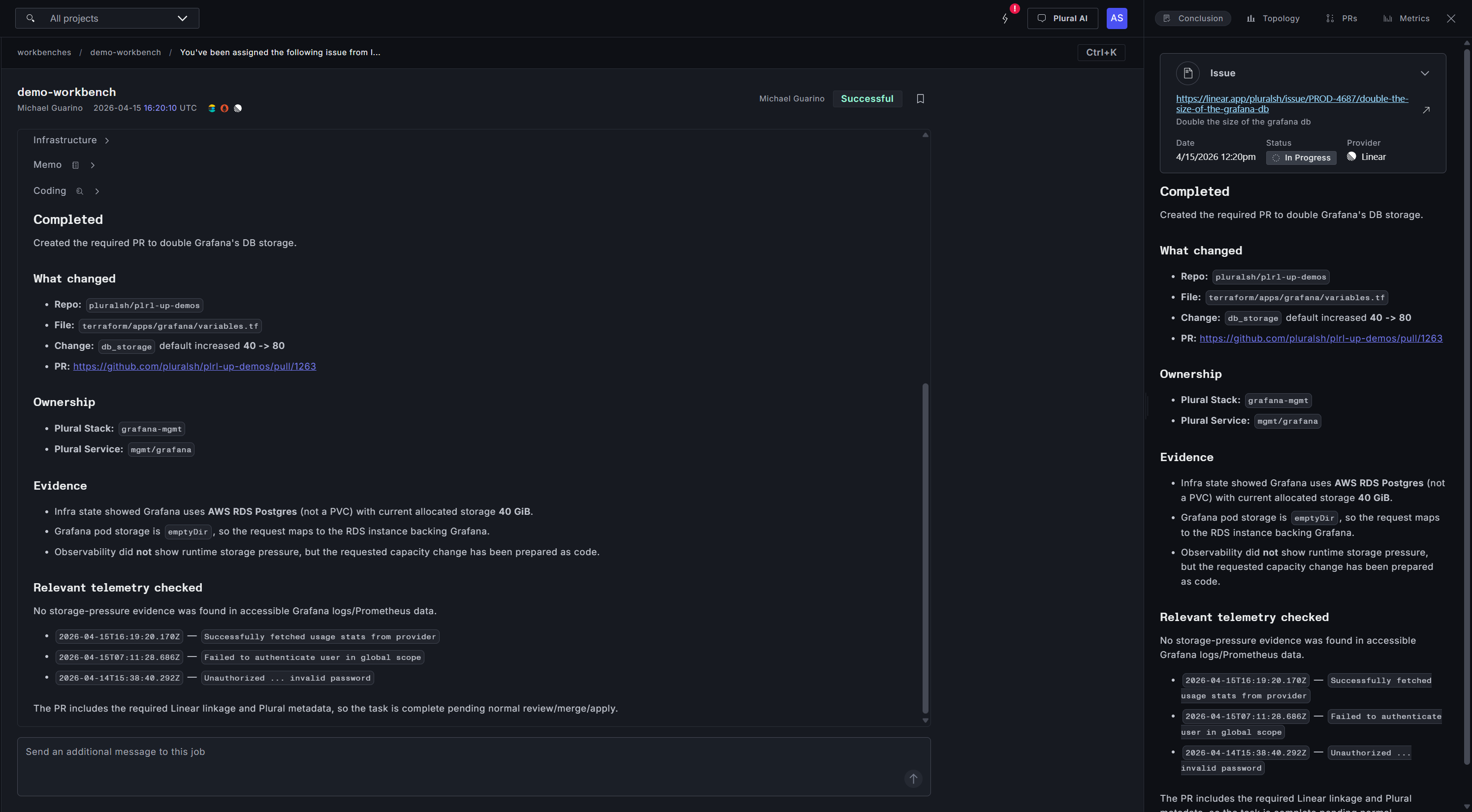
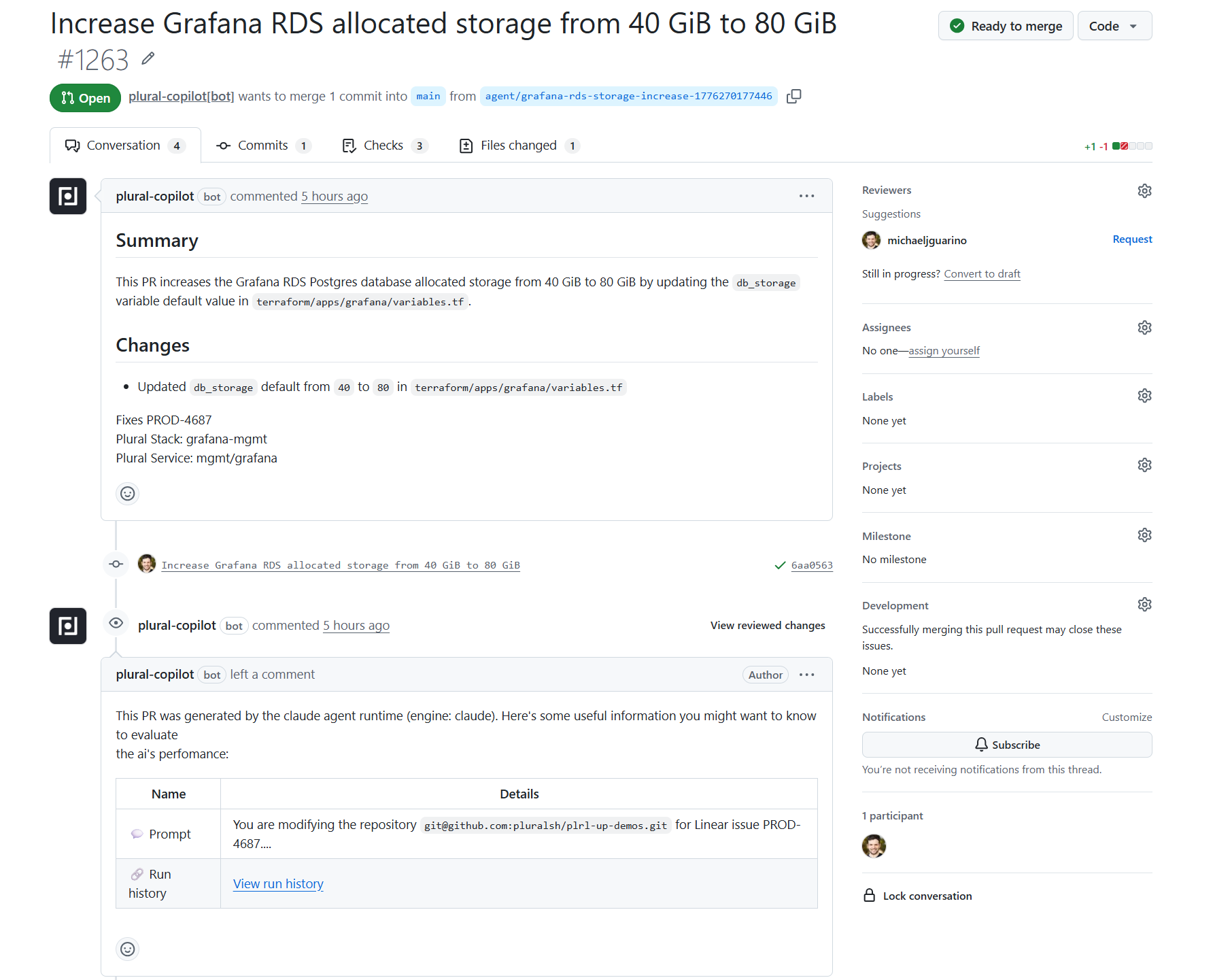
The human work left is review. The context-gathering, cross-referencing, and first-draft authoring are done.
Why it matters: this is real backlog work, not just keep-the-lights-on maintenance. For the first time you can hand the Workbench a meaningful chunk of the engineering queue and get reviewable changes back. The team's time compounds against the roadmap instead of against the runbook.
Case Study 4: Upgrade Every Cluster in One Prompt
This fourth example handles the kind of task that every platform team dreads doing: a Kubernetes version upgrade across a fleet.
The prompt is simple: upgrade all EKS clusters under 1.34 for me. The infra subagent inventories the estate — three EKS clusters across dev, dev01, and prod, all running 1.33. It maps each cluster back to its managing GitOps repo and Plural service overlays, identifies the Terraform stacks that own the version declaration, notes the region topology and node group implications, and drafts a suggested execution plan: update the desired version in each cluster's Terraform module inputs, apply dev first, then prod, and verify node group/addon reconciliation to 1.34-compatible versions afterward.
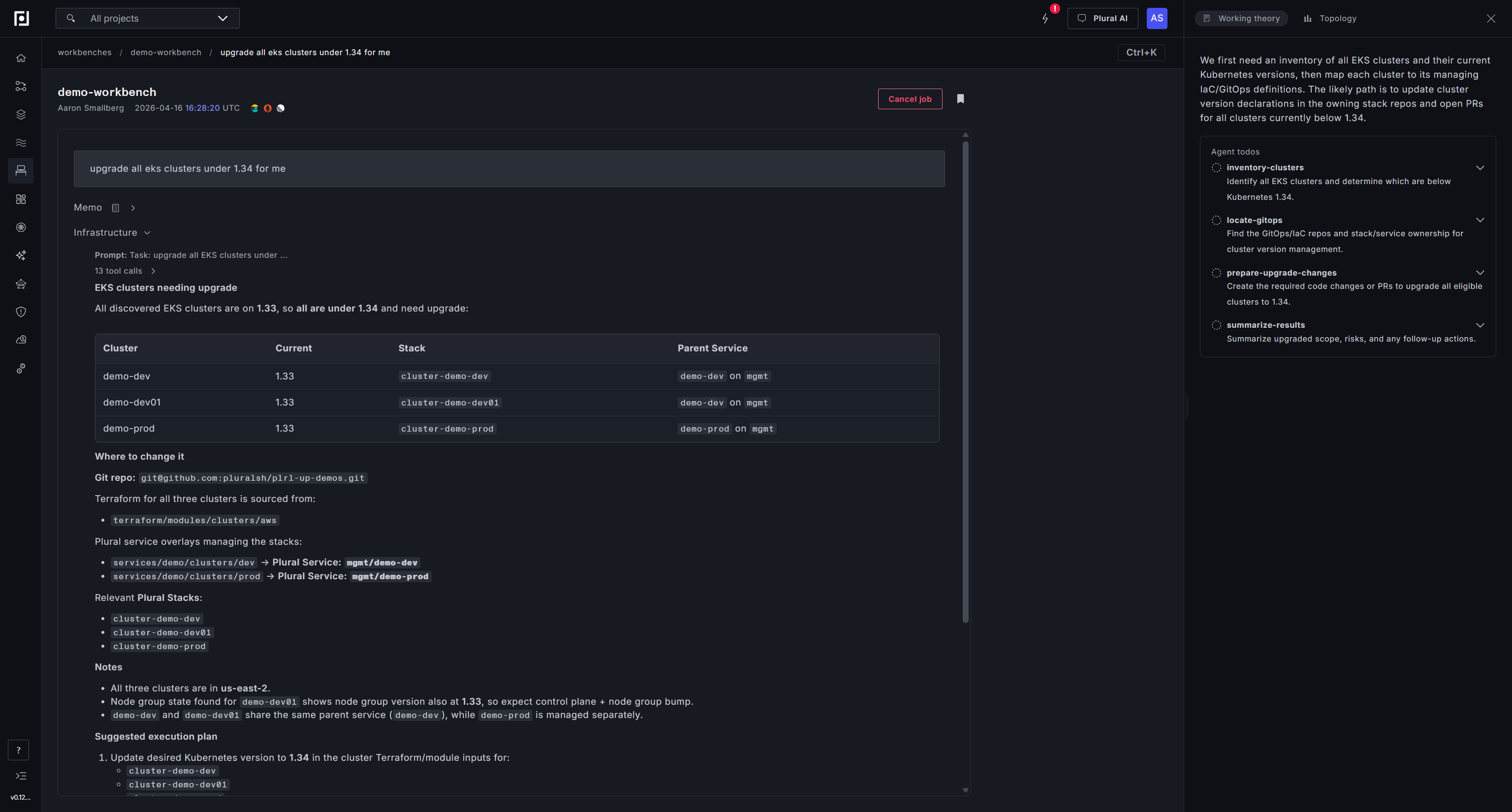
The coding subagent takes it from there. Because all three clusters are driven by the same shared GitOps configuration, one PR is sufficient — a clean version bump from 1.33 to 1.34 across services.yaml and pipelinecontext.yaml, with ownership tags for every affected Plural Stack and Service included in the change. The PR passes Terraform plan validation and security checks automatically. What's left is a human clicking merge and watching the rollout.
Why it matters: fleet-wide upgrades are the poster child for complex, yet tedious work. You know what needs to happen — bump the version — but the prerequisite research (which clusters exist, what version they're on, what stack owns each one, what the safe rollout order is) turns a one-line change into a multi-day project. A Workbench compresses the inventory, the impact analysis, and the first-draft change into a single run. The team reviews a PR instead of building a spreadsheet.
Under the hood
Workbenches ship with native integrations for Datadog, Prometheus, Loki, Tempo, Elasticsearch, OpenSearch, and Sentry on the observability side; GitHub, GitLab, Linear, Jira, and Asana on the ticketing and SCM side; and generic MCP server support for anything else your team runs. Every Workbench executes on the Agent Runtime inside your own cluster, with bring-your-own-LLM — OpenAI-compatible endpoints, Azure, Bedrock, Ollama, or anything else. No data leaves your perimeter.
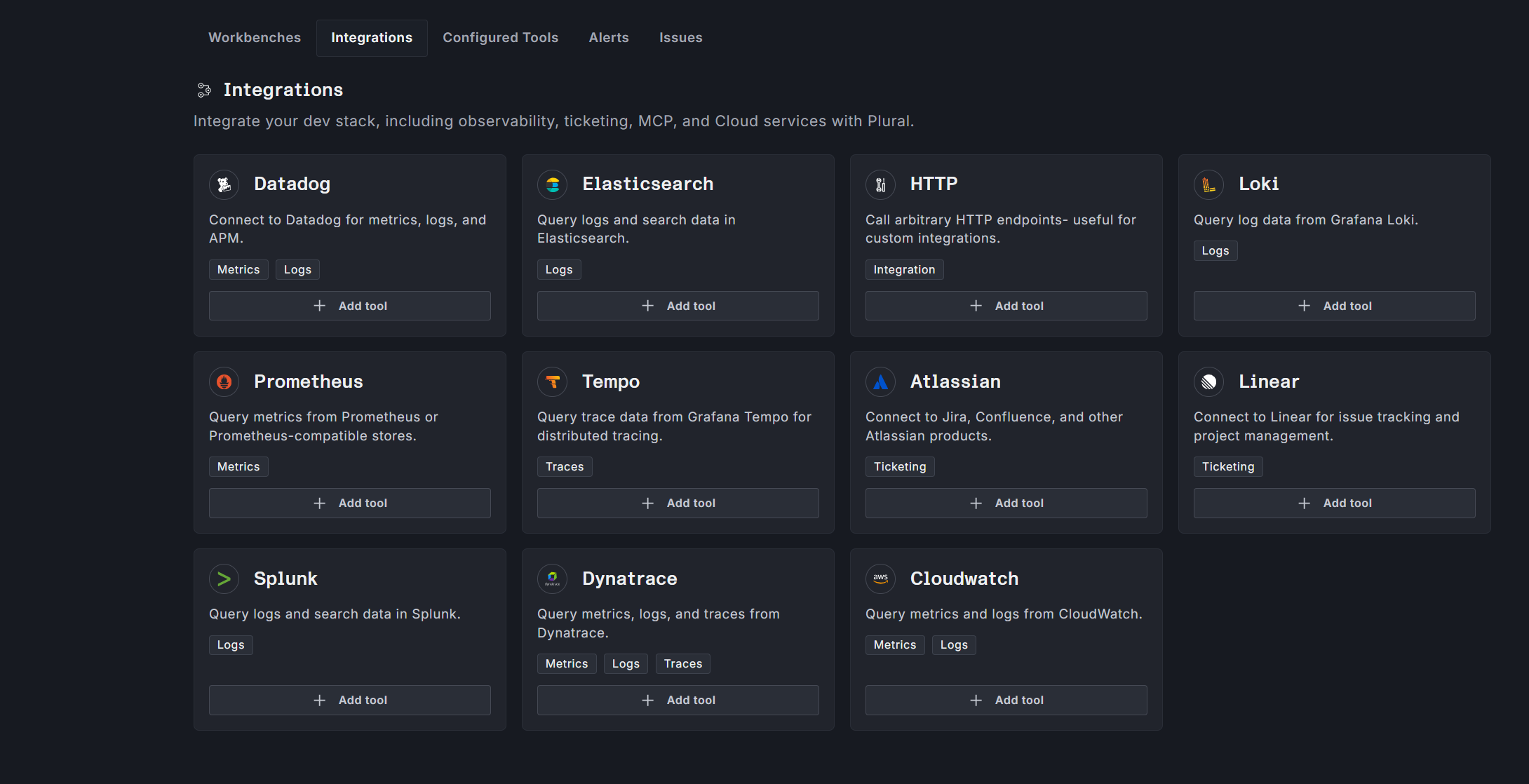
Every action the AI takes produces a pull request for human review. No direct writes to production. Full GitOps purity preserved.
What's next
Plural has always been the place your infrastructure is defined and deployed. With Workbenches, it becomes the place your infrastructure is actively managed — by agents you configure, grounded in the context you've already built up, running on compute you already own.
If you want to see a Workbench run against your own environment, talk to us. And if you want to go deeper on how it's built, the docs have the full picture.
We're handing your team the shift from reactive operations to always-on operations. The runbook is no longer the ceiling.

Newsletter
Join the newsletter to receive the latest updates in your inbox.